

How to Check Case Status in the Supreme Court of India
You want to know exactly where your matter stands in the Supreme Court, and you do not want to wade through a cluttered website to find it. Checking case status in supreme court of india takes less than five minutes once you know which search field to use, whether that is your diary number, case number, or party name. This guide gives you the direct steps, no guesswork involved.
The Supreme Court of India runs a public case status portal that shows listing dates, the bench assigned, disposal status, and the last order passed. Most delays in finding your case happen because people search with the wrong number format or skip the diary number lookup that the system actually needs first. Once you enter the correct details, the portal pulls up everything from filing date to the current stage of hearing.
In the sections below, I walk through each method step by step, checking by case number, by diary number, and by party name, along with what to do if your case does not show up at all. I also cover how tools like LeXi AI can help you track multiple matters and pull case summaries alongside the official court status search, without replacing the official record you get from the Supreme Court itself.
Which ofine, whyour the entcase status Supreme Court hasal a portal, and it every search field is tied to a distinct number that the regististry assigns when your matter is filed. Before you open a search, gather whatever paperwork you have from your lawyer or the filing desk, because the details on it will save you multiple failed searches.**Before opening the search, gather whatever paperwork you have from your lawyer or the filing desk, because the details on it will save you multiple failed searches.**Wait, formality register:
Step 1. Search using the case number or diary number
The fastest starting point for most litigants is the case number search on the Supreme Court's official case status page. If your matter has already been registered and assigned a formal case number, such as a Civil Appeal, Special Leave Petition, or Writ Petition number, you can pull up the status in under a minute using that number along with the year of filing.
Where to find the case number search
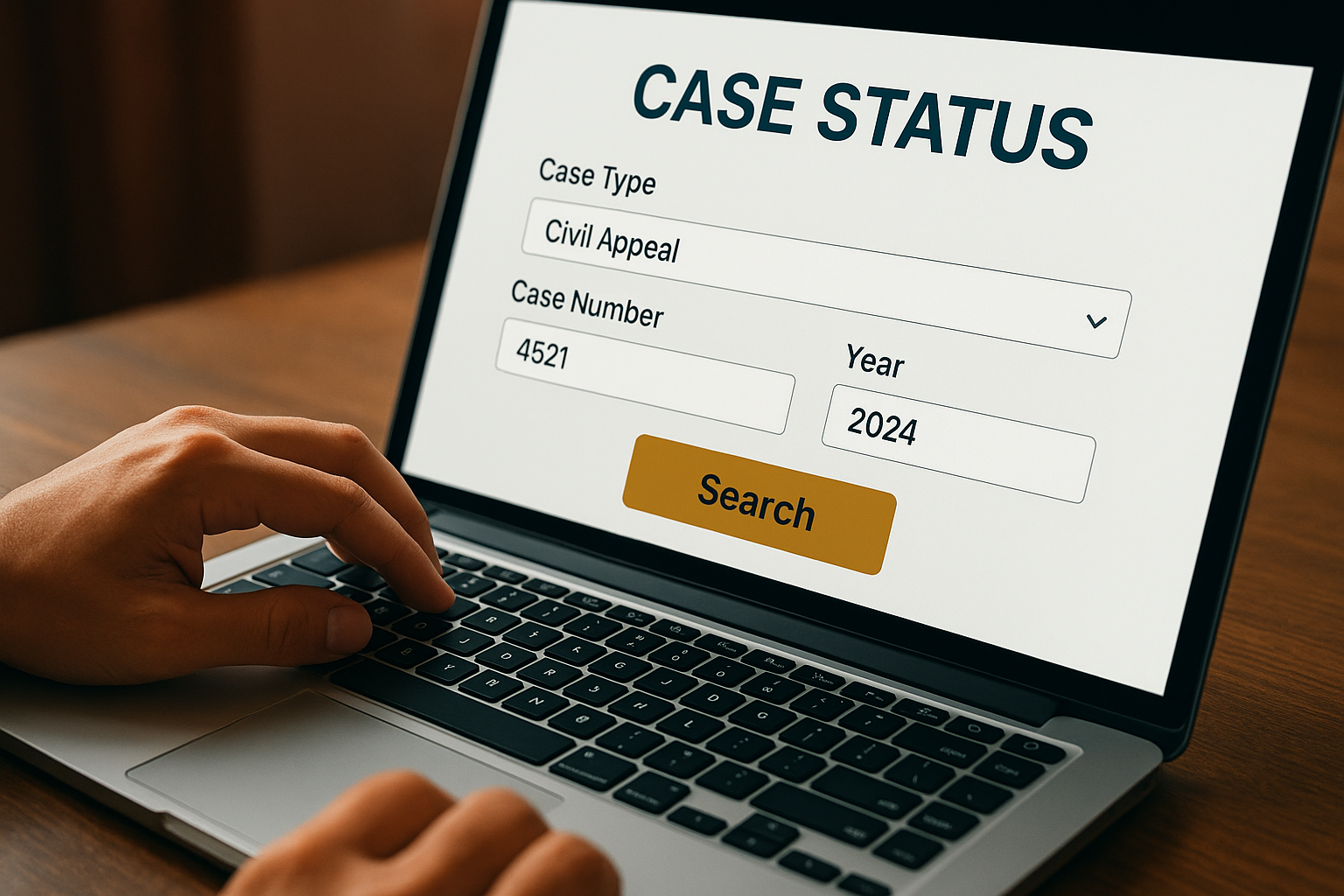
Go to the Supreme Court of India website at main.sci.gov.in and open the "Case Status" section from the main menu. This takes you to a form where you choose the case type from a dropdown, then enter the case number and year.
Case Type: Civil Appeal
Case Number: 4521
Year: 2024
Submit the form and the portal returns the current stage, the bench it is listed before, and the date of the last order.
When to use the diary number instead
If your case is still fresh and has not yet been assigned a formal case number, you need the diary number instead. The registry issues this number the moment your petition is filed, well before admission or numbering. Most lawyers hand this over to clients within a day or two of filing, so check your filing receipt or ask your counsel directly if you do not have it.
If your matter is recently filed, search by diary number first. Searching by case number too early will show nothing at all.
Here is a quick way to decide which number to use:
- Case freshly filed, no hearing date yet: use the diary number.
- Case already listed at least once: use the case number and year.
- Not sure which stage your case is at: try the diary number first, since it works at every stage after filing.
One common mistake is typing the year of the hearing instead of the year of filing. The portal matches records against the filing year, so a mismatch here returns a blank result even when the case genuinely exists in the system.
Step 2. Search using the CNR number for exact results
Every case filed across Indian courts, including the Supreme Court, now carries a CNR number, short for Case Number Record. This is a unique 16-digit alphanumeric code that stays fixed for the life of the matter, unlike the case number or diary number, which can vary in format depending on the bench or registry entry. Using the CNR number is the most reliable way to pull up your court status search result without any risk of matching the wrong case, since no two matters ever share the same code.
Where to find your CNR number
Finding this code is usually simple if you already have any court document in hand. Look at the top of your cause list entry, your certified copy application, or the acknowledgment slip your lawyer received at filing. The format typically looks like this:
CNR Number: SCIN01-123456-2024
Government portals also allow SMS-based retrieval in many states, though for Supreme Court matters, your advocate-on-record or the filing counter is the most dependable source.
How the CNR search differs from case number search
Once you have the code, head to the Case Status page on main.sci.gov.in and select the CNR search tab instead of the case number or diary number tab. Paste the code exactly as printed, including hyphens if the system requires them, and submit. The result loads the full case history in one screen, covering listing dates, orders passed, and the current bench, without needing you to separately confirm the case type or filing year.
A CNR number search skips every ambiguity that trips up case number or diary number searches, because the code is unique to your matter alone.
This method works especially well if you are tracking a case that has moved between benches or has multiple connected matters tagged together, since the CNR record often links related filings on one page. If your document does not list a CNR number at all, it likely means the matter was filed before the code was made mandatory, in which case you fall back on the diary number or case number method covered earlier. For most litigants filing since 2013, though, the CNR number gives the cleanest path to checking case status in supreme court of india without repeated failed attempts.
Step 3. Search by party name or AOR code
Sometimes you do not have a case number, diary number, or CNR handy, maybe a client called asking about an old matter and all you remember is the opposing party's name. The Supreme Court's party name search option on the Case Status page handles exactly this situation, though it takes a bit more patience than a direct number lookup since a common surname can pull up dozens of results.
Searching by party name
Open the Case Status section on main.sci.gov.in and select the party name tab. Type the petitioner or respondent name as it appears on the cause title, since the system matches text strings rather than guessing at spelling variations. Government entities like "Union of India" or "State of Maharashtra" return a long list, so pair the name with the case type and year if the form allows it, narrowing results before you scroll through pages of unrelated matters.
A party name search works best as a fallback, not a first choice, because shared surnames and government litigants flood the results list.
Searching by Advocate-on-Record (AOR) code
Lawyers tracking their own docket often find the AOR code search faster than party name lookups. Every Advocate-on-Record registered with the Supreme Court holds a unique code assigned at enrollment, and searching by this code pulls up every matter filed under that AOR, current and disposed. This is particularly useful for chambers managing dozens of matters across benches, since one search replaces individually checking each case number.
Here is a quick reference for choosing between the two:
| Search type | Best used when |
|---|---|
| Party name | You know one party's name but no case number |
| AOR code | You are the filing advocate tracking multiple matters |
Combining either method with the CNR search covered earlier gives a fuller picture, since once a party name search surfaces the matter, noting its CNR number saves time on every future check. Firms handling high case volumes sometimes feed these results into a tracking tool like LeXi AI, which keeps a running list of matters alongside the last order passed, though the official portal remains the record of truth.
Step 4. Check status through eCourts or the SCI mobile app
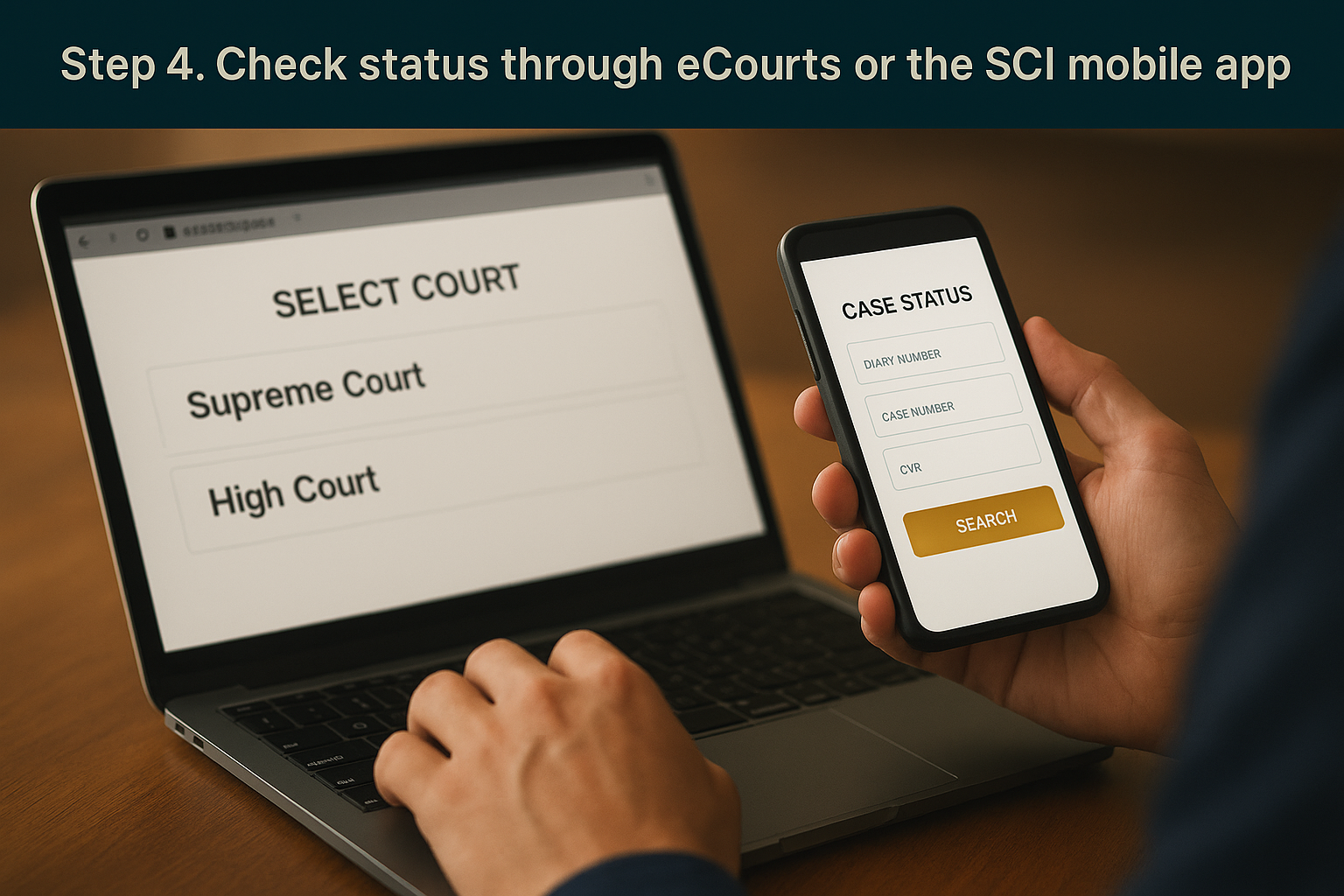
Beyond the Supreme Court's own website, two other channels give you the same case status without opening a browser tab dedicated to main.sci.gov.in. The eCourts services portal and the official SCI mobile app both pull from the same registry database, so the information you see matches what the website shows, just presented in a slightly different interface.
Using the eCourts portal for Supreme Court matters
Go to ecourts.gov.in and select the Supreme Court option from the case status section. The portal accepts the same identifiers you already have, CNR number, case number, or party name, and returns listing dates, bench details, and order history in a similar format. This route works well if you already track other court matters through eCourts, since you avoid switching between multiple sites for High Court, District Court, and Supreme Court checks.
Checking through eCourts saves you a login switch if you already monitor High Court or District Court matters on the same platform.
One detail worth noting: eCourts pulls Supreme Court data on a slightly delayed refresh compared to the Court's own site, so if you need the absolute latest order passed within the last few hours, go straight to main.sci.gov.in instead.
Using the SCI mobile app
Download the official Supreme Court app from the Google Play Store or Apple App Store, search for "Supreme Court of India" and confirm the publisher is listed as the Court itself before installing. Once installed, the app gives you a compact case status search built for phone screens, useful for quick checks between hearings or while traveling.
Here is how a typical lookup on the app runs:
- Open the app and tap Case Status
- Choose your search type, diary number, case number, or CNR
- Enter the details and tap Search
- Save the result to your app history for faster access next time
Saved searches matter more than they sound, since chambers running several matters at once often check the same handful of cases every morning. The app remembers your last searches, cutting a five-step lookup down to two taps once you have run it once.
Staying on top of your case status
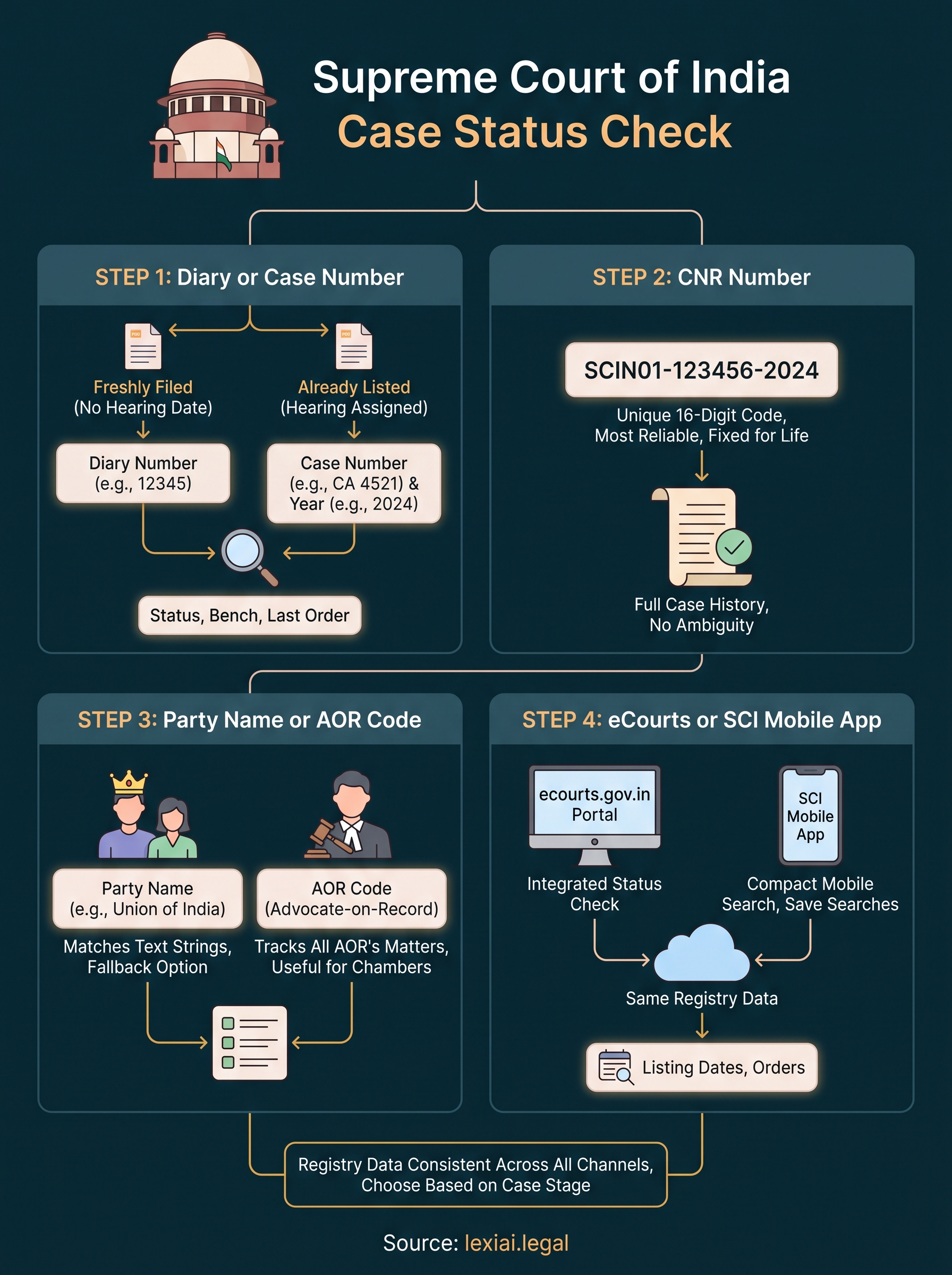
Checking your matter on the Supreme Court portal is not complicated once you know which number unlocks which search field. Whether you start with the diary number, move to the CNR code, or fall back on party name and AOR searches, the registry data stays the same across the website, eCourts, and the mobile app. The real skill is knowing which method fits your stage of litigation, so you stop wasting searches on blank results.
Firms and independent lawyers tracking more than a handful of matters eventually need something beyond bookmarking main.sci.gov.in, since manually rechecking each case number every morning eats into billable hours. This is where a connected platform helps, pulling case summaries, order histories, and drafting support into one place instead of five browser tabs. If you want that kind of running view across your docket alongside your case status checks, take a look at the LeXi AI platform and see how it fits your practice.