

How to Check the NCLT Cause List Online
You have a hearing tomorrow before NCLT, and you need to know which bench, what time, and where your matter sits on the board. Checking the NCLT cause list online is the fastest way to get that answer, and you do not need a paid subscription or a clerk on the ground to do it. The official NCLT website publishes cause lists bench-wise every working day, usually by evening for the next day, and they are open to anyone with the case number or party name.
This guide answers exactly that question: how do you pull up the correct cause list, for the right bench, for the right date, without wasting time on outdated PDFs or mismatched case numbers. You will learn where the cause list section sits on the NCLT portal, how to filter by bench, court number, and date, and how to read the listing once it loads, including item numbers, coram, and case status.
We also cover the common problems lawyers run into, such as lists that fail to load, benches that update late, or matters that get adjourned without notice on the list itself. For lawyers juggling multiple benches and dozens of matters, cross-checking cause lists manually every day eats into billable hours, which is where tools like LeXi AI can help by flagging your listed matters and hearing dates automatically alongside your other case tracking.
What is the NCLT cause list
The NCLT cause list is the official daily roster published by the National Company Law Tribunal, showing which cases each bench will hear on a given date. It lists the case number, the parties involved, the item number on the board, and the coram, meaning the judges or members hearing that bench that day. Every one of the 16 NCLT benches across India publishes its own list, so a matter filed in Mumbai will never show up on the Delhi bench list, even if the case type is identical.
Why lawyers check it daily
Most practicing lawyers check the cause list every evening for the next day's hearings, since NCLT does not send individual notices for routine listings. Missing a listing because you did not check the board can mean an ex parte order or a missed opportunity to argue. That single habit, checking the list before you leave office, saves more adjournment headaches than any other daily task.
A missed listing on the NCLT cause list can cost you the hearing itself, not just your place on the board.
Types of cause lists you will encounter
NCLT publishes more than one kind of list, and knowing the difference saves confusion:
- Daily cause list: the standard next-day listing for each bench
- Advance cause list: a longer-range list, often for a week or more ahead
- Supplementary list: added matters or corrections issued after the main list goes live
Each type matters for different planning needs, from daily prep to scheduling client meetings around a hearing week.
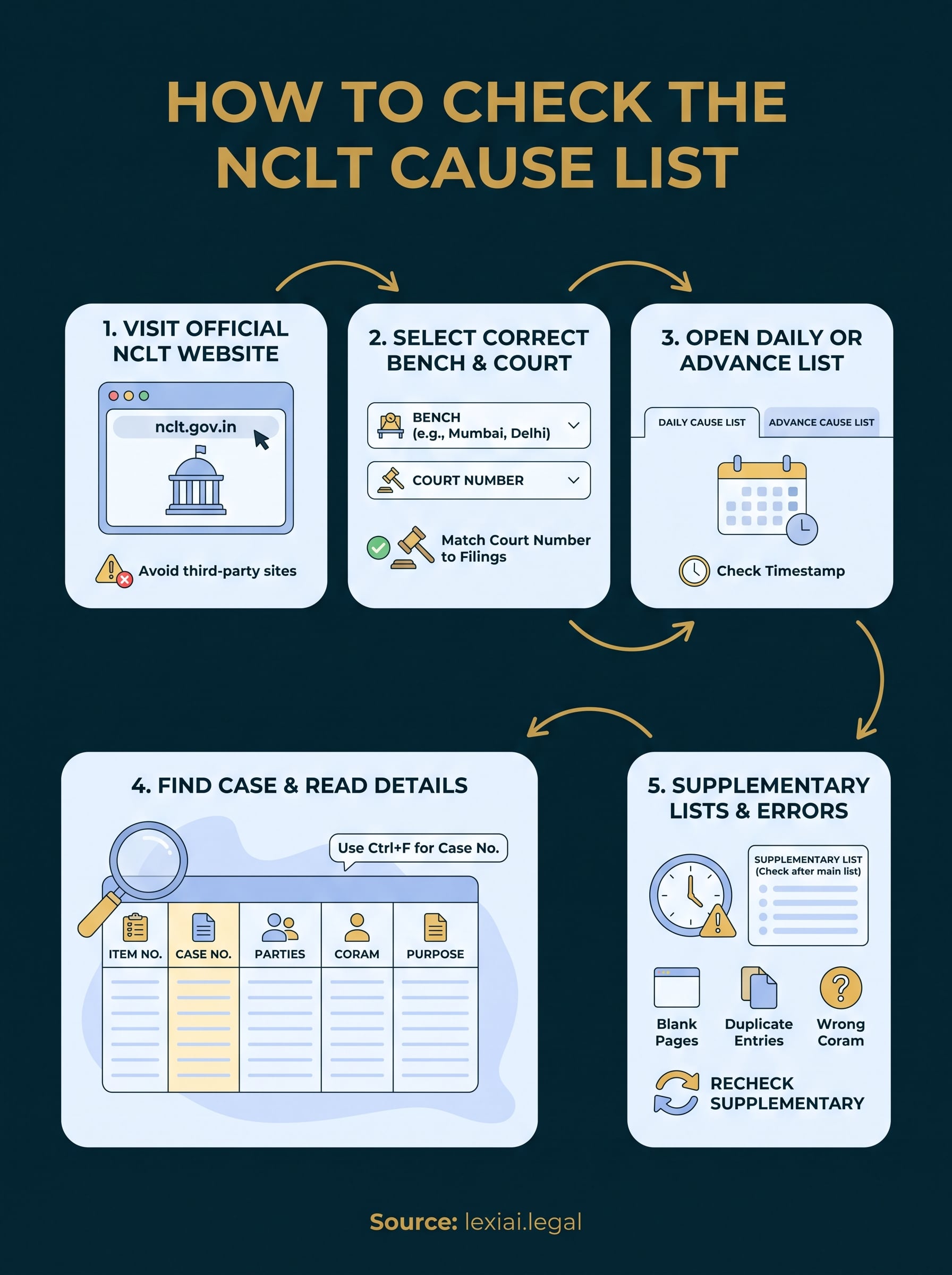
Step 1. Visit the official NCLT website
Start at the official portal, nclt.gov.in, since third-party aggregators often carry outdated or mismatched listings. The NCLT website hosts cause lists under a dedicated tab, usually labeled "Cause List" on the homepage menu, separate from orders and case status sections. Bookmark this page if you check listings daily, since NCLT does not maintain a permanent shortcut URL for each bench.
Confirm you are on the right portal
Several copycat or outdated sites mirror old NCLT layouts, so always verify the domain before entering a case number or party name.
- Check the URL reads nclt.gov.in, not a state-specific or law-firm-hosted mirror
- Look for the tricolor government header and Ministry of Corporate Affairs branding
- Avoid saved links from old bookmarks, since NCLT periodically restructures its menu
Always confirm the domain before you search, a wrong portal wastes more time than a slow one.
Once you land on the correct tab, the site usually loads a bench-selection screen, which is where the next step begins.
Step 2. Select the correct bench and court
After you land on the cause list page, pick your bench from the dropdown menu, such as Mumbai, Delhi, Chennai, or Kolkata. NCLT operates 16 benches across India, and selecting the wrong one shows you a completely different set of matters, even if the case type matches yours. Below the bench selector, you will usually find a court number field, since larger benches split hearings across multiple courtrooms on the same day.
Match the court number to your case
Double-check the court number against your last order sheet or vakalatnama filing details, since courts get reassigned when members go on leave or transfer.
- Confirm the bench name matches your filing state, not your client's registered office
- Select the specific court number if the bench lists more than one courtroom
- Refresh the page if the court dropdown does not populate after choosing a bench
Picking the wrong bench wastes the entire search, since no amount of scrolling will surface your matter there.
Once both fields are set, move to loading the actual list for your date.
Step 3. Open the daily or advance cause list
With your bench and court number set, choose between the daily cause list and the advance cause list, depending on what you need. The daily list shows tomorrow's board, while the advance list stretches out a week or more, useful when you are planning travel or briefing a senior counsel ahead of time. Click the date field and select the specific hearing date, since the portal defaults to the current day and will not auto-advance for you.
Pick the right list format
Most benches publish the list as a downloadable PDF, though some now offer a searchable HTML table.
- Choose PDF if you want to save or print the board for court
- Choose HTML view if you only need to scan for your case number quickly
- Check the file timestamp before relying on it, since evening updates sometimes lag
Always check the list timestamp, a cause list from an hour ago can already be outdated.
Once the correct list opens, you are ready to locate your matter on the board.
Step 4. Find your case and read the details
Once the list loads, use Ctrl+F within the PDF or browser to search your case number or party name instead of scrolling through hundreds of entries. Most benches list matters in item number order, not alphabetically, so searching by case number is faster than hunting by party name, especially on busy benches like Mumbai or Delhi with 150 plus items a day.
Read the columns correctly
Each row on the cause list carries specific fields you need to note before the hearing.
- Item number: your position on the board, useful for estimating call time
- Case number: match this exactly against your vakalatnama or filing
- Parties: confirm both petitioner and respondent names
- Coram: the member or bench hearing the matter that day
- Purpose: the stage listed, such as admission, arguments, or for orders
Match every field, not just the case number, since two matters can share similar numbering across benches.
Once you confirm all five fields, you have everything needed to prepare and appear on time.
Step 5. Handle supplementary lists and common errors
After the main list goes live, check the supplementary cause list before you close your laptop for the night, since benches often add late-filed urgent matters or corrections hours after the first upload. Skipping this second check is how lawyers miss same-day additions that were never on the original board.
Common errors to watch for
Several recurring glitches trip up even experienced practitioners on the NCLT portal.
- Blank or unresponsive pages: try a different browser or clear cache before assuming the bench has no list
- Case listed twice: verify which item number is current, since duplicate entries sometimes appear after amendments
- Wrong coram shown: cross-check with the registry if a member transfer happened recently
- PDF fails to open: download instead of viewing in-browser, since some benches host large scanned files
Always recheck the supplementary list, since the main cause list is rarely the final word on your hearing date.
Build this second check into your evening routine, right after the daily list.
Staying on top of your NCLT hearings
Checking the NCLT cause list daily is not optional if you want to avoid ex parte orders or missed arguments. Follow the five steps here, correct bench, correct court, correct date, careful reading, and a second check on the supplementary list, and you will rarely get caught off guard by a hearing you did not see coming.
Getting this right every single day across multiple benches is tedious work, even for a well-organized practice. That daily grind is exactly why many lawyers now let software handle the routine tracking while they focus on arguments and drafting.
If you handle matters across several benches or want your hearing dates flagged automatically instead of checking each portal by hand, take a look at what LeXi AI offers across case tracking, drafting, and research. It will not replace your judgment in court, but it will make sure nothing on the board catches you by surprise.